In the current competitive business world, first impressions are critical. Your LinkedIn Banner is the first thing that a visitor can view while visiting your profile. It appears at the very top of your page, covers the full width of the screen, and conveys who you are, what you are doing, and what makes you special – even before a visitor reads a single word of your bio. However, even with its significance, LinkedIn Banner is one of the most neglected aspects of personal branding on the site. As a job seeker, freelancer, entrepreneur, or corporate, a more attractive profile can be achieved by designing a personalized banner with a significant impact on appeal and credibility. The good news? You do not have to be a graphic designer or to buy costly software. A free online banner making tool provides you with all you need to make something professional and polished within a few minutes.
The importance of your LinkedIn banner
However, before plunging into the design process, it is worth knowing why it can be of great professional benefit to spend even a little bit of time on your LinkedIn Banner. Research indicates that customized image profiles attract a lot more likes and profile views in comparison to the default blue image. A professionally thought out banner is a silent elevator pitch – it conveys your industry, values, and brand personality without a word. In the case of businesses, it develops trust and brand loyalty. To people, it is a sign of professionalism and care to detail. Imagine it as your online office door: it must be appealing, brand-friendly, and tell your professional narrative.
Knowing the Right Dimensions and Specifications
Before opening a design tool, it is essential to get the dimensions right. Several free banner creators on the Internet have templates set to LinkedIn-specifically set to these specific sizes, so you do not need to go through the hassle of adjusting banner sizes manually. The mobile viewing should also be considered during the design as a large percentage of LinkedIn users use the platform via their smartphones, and the banner can look different on the device.
Selecting the Appropriate Free Online Banner Maker
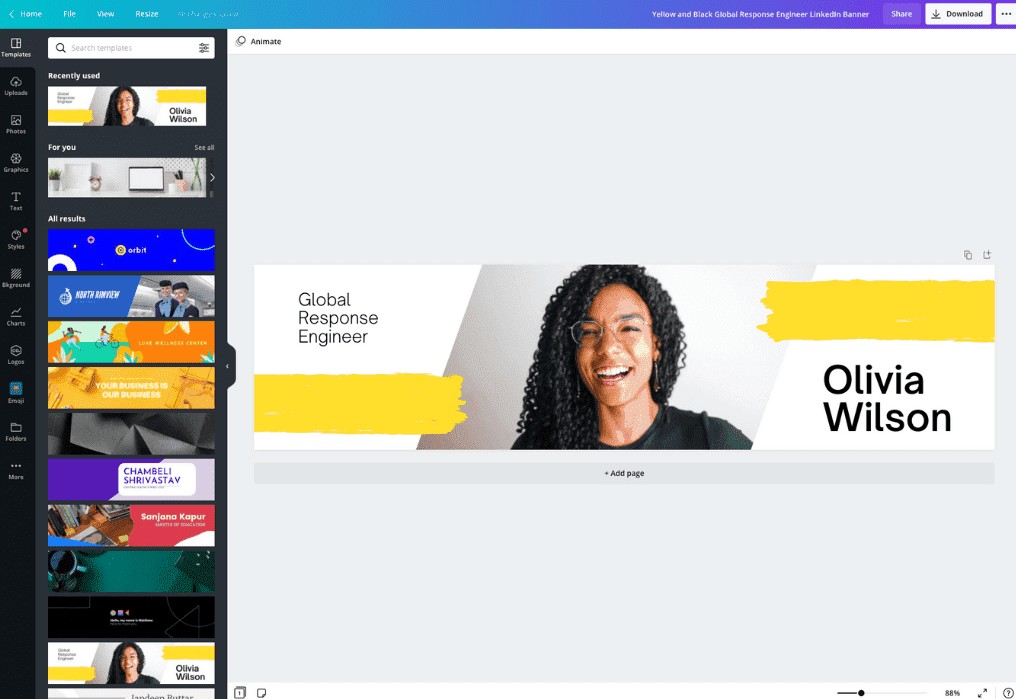
However, there are also quite a few great free resources that allow creating a banner with ease, no matter the level of design experience. Of which Canva is perhaps the most established, with an enormous collection of editable headers, typefaces, icons & stock photos made for LinkedIn-specific use. Fotor and VistaCreate also are worth considering their flexibility and creative assets. In choosing which tool to use, seek one that has LinkedIn templates, simple text editing, option to add your own images or logo and simple exportation. The majority of such sites enable you to get your completed design in high res and without the necessity to open the paid version.
How to Make your own LinkedIn Banner
After selecting a banner maker to use, the next step is choosing a professional branding relevant template. Pick a color scheme that reflects your personal brand or suits your industry: blues and grays are very trustworthy/professional, but if you work in a creative field, feel free to incorporate some warmer colors. Introduce your own headshot or brand logo wherever you can. In short, use proper icons or subtle background images to add some richness without cluttering. Once happy with it, save it as a PNG (for crispest quality) and upload to your LinkedIn profile easily via the background photo “Edit” option.
Essentials in Designing a Professional outcome
Creating a fantastic LinkedIn Banner is restrained as much as it is creative. All in all, an overloaded banner will not work as a sufficient design element, when the image is much simpler it can be the best visual of all. Ensure you choose very contrasting colors for your text so a reader can read what you are trying to convey at a glance as well as using clean and professional typefaces not decorative or hard to read. Be consistent: you need your banner, your profile picture and general tone to work in harmony. Periodically change your banner to indicate changes in your career, new accomplishments or seasonal offers in case you own a business. An old banner may be an indicator that you are doing nothing, which is why you should consider it an active component of your professional brand. It is important to keep in mind that your LinkedIn Banner is not merely ornamentation, but one of the most economical visual assets you can have on the site.
Conclusion
The process of creating a tailor-made LinkedIn Banner does not demand any graphic design skills or a substantial investment anymore. The availability of numerous free online banner creators today has made it possible to create an aesthetically pleasing and professionally-slick header within less than 30 minutes. The process is simple and very fulfilling, starting with picking the right template and size to create and then having a concise message and exporting it to the right format. A powerful banner gives your profile a better visual effect and solidifies your personal brand as well as conveying that you are professional to all recruiters, clients, or colleagues who come to your page. Put time into creating a banner that reflects you in a positive way because in the online-based career world, what you say can be as effective as what you see.

Rachel Collins is the founder and creative voice behind Pun Boom, where words go BOOM! A writer with a sharp wit and a love for wordplay, Rachel turns everyday ideas into clever, laugh-worthy puns that spark joy and creativity. She believes humor connects people one pun at a time and aims to make readers smile with every post. When she’s not crafting puns, she’s exploring new ideas, chasing inspiration, and enjoying the lighter side of life.