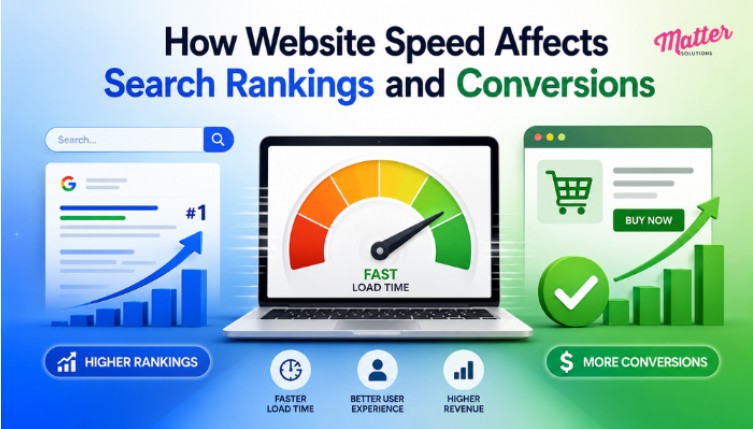
Website speed affects search rankings and conversions by influencing user experience, bounce rates, and how search engines evaluate page performance. It’s one of those things that looks fine on the surface until the rankings start slipping and the numbers tell a different story.
At Matter Solutions, we diagnose factors like these. Then we implement targeted optimizations to improve website speed, enhance search rankings, and create a smoother experience that keeps visitors engaged.
In this article, we’ll share that workflow with you, including:
- How speed connects to your search rankings
- How load time hits your conversions
- Which technical fixes improve web performance
If your site isn’t performing the way it should, understanding the Core Web Vitals is a good place to start.
What Are Core Web Vitals and How Does Google Measure Them?
Core Web Vitals are three real-user metrics Google uses to evaluate loading, responsiveness, and visual stability. Unlike lab-based speed test scores, Google pulls this data directly from the Chrome User Experience Report (what real visitors experience on your website is what actually counts).
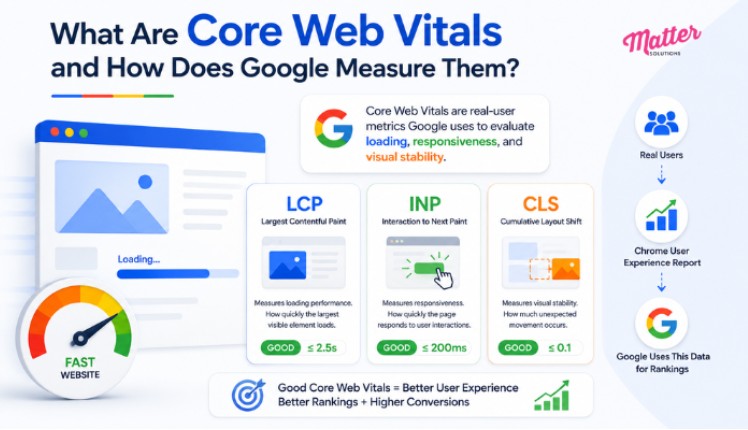
Below is a breakdown of each Core Web Vitals metric and what it’s measuring on your site.
Your Page’s Loading Performance: Largest Contentful Paint
LCP measures how quickly the largest visible element on a web page loads, and a good score sits at 2.5 seconds or under. Think of it as the moment a visitor decides the page is working.
From our experience auditing websites, unoptimized images are among the most common reasons LCP falls into the poor range. That’s right alongside render-blocking CSS files, which force the browser to process stylesheets before displaying anything visible.
As a solution, it’s best to fix the images first, then look at what the browser is waiting on.
Interaction to Next Paint and How It Measures Clicks
Picture a product page where a user clicks “add to cart”, and nothing happens for half a second. That delay is what INP captures. It’s almost always caused by heavy JavaScript blocking the main thread from responding to user clicks.
INP basically measures full-session responsiveness across different devices, rather than just the first interaction a visitor makes. An optimum score ideally sits under 200ms, while anything past 500ms signals a page that feels genuinely unresponsive.
Visual Stability During Load: Cumulative Layout Shift
Late-loading ads and images without defined dimensions are common culprits behind poor visual stability on most sites. The real damage shows up when a visitor goes to click something and the layout shifts at that moment, and sends the click somewhere unintended (most sites don’t even find out until a user complains).
For this issue, CLS tracks unexpected movement of page elements as a web page loads, with a good score at 0.1 or under. Improving this grade usually comes down to setting fixed dimensions on images and reserving space for any dynamic page elements before they load.
Slow Load Time Hurts Your Conversions and Revenue
A one-second delay in page load time reduces conversions by up to 20%, and that’s a direct hit to revenue on any website. Most businesses track traffic and search rankings closely, but website performance data tells a different story.
Here’s what the research shows about how load time affects real business outcomes.
| Load Time Increase | Bounce Rate Impact | Conversion Impact |
|---|---|---|
| 1s to 3s | +32% bounce probability | Around 7% drop in conversions |
| 1s to 5s | +90% bounce probability | Conversion rate 3x lower vs. 1s load |
| 1s to 10s | +123% bounce probability | Maximum 20% drop on mobile |
| Under 2s load | Lowest bounce rates across devices | Ecommerce conversion rates up to 3.05% |
Not to mention, 53% of mobile users abandon a web page if it takes longer than three seconds to load (and mobile users show even less grace than desktop users do).
Slow loading speeds ultimately create a ripple effect across your entire website. Visitors leave sooner, conversions decline, and the performance metrics you rely on become harder to improve over time.
Which Technical SEO Fixes Move Your Site Speed?
Technical SEO fixes like image optimization, caching, code minification, and Core Web Vitals improvements have the most impact on website speed. They’re generally fixable without rebuilding anything.

Take a look at the fix areas that are most effective on web performance.
Compressing Images and Minifying CSS Files
Images are typically the largest contributor to page weight, and converting to WebP format can cut file size by 25-34% compared to JPEG. Along with that, minifying CSS files strips out whitespace, comments, and redundant code. This reduces file size without changing how the page looks or loads in the browser.
Render-blocking CSS files also delay LCP by forcing the browser to finish processing stylesheets before showing any visible content. So optimize images first, then work through your CSS files to clear what’s slowing the browser down.
Time to First Byte (TTFB): Why Your Server Response Is Important
TTFB measures the time between a browser’s page request and the moment the first byte of data arrives back from the server.
During our performance audits, not many mobile pages achieve a good TTFB score. In fact, we often see sites with poor LCP spending an average of 2 seconds on TTFB alone. That nearly exhausts the full 2.5-second threshold before the page even begins to render.
For this scenario, better hosting and server-side caching are where the fix usually starts.
Using a CDN to Deliver Faster Load Times Worldwide
A CDN (Content Delivery Network) stores copies of site files on servers close to the user, which cuts the physical distance data has to travel across the web. Instead of every request routing back to a single origin server, visitors get resources pulled from locations nearest to them.
This works across desktop and mobile devices, and it’s one of the more reliable services for consistent web performance globally. That said, a CDN performs best alongside hosting upgrades, since a fast edge network can’t fix a slow origin server response on its own.
Pro Tip: Monitor your TTFB before and after to see the difference in test results. That comparison gives you a clear picture of whether your optimization efforts are reducing server response times.
Is Your Website Speed Holding Back Your Growth?
Speed issues chip away at rankings and revenue until the gap becomes hard to close. And by then, the damage is already done. The good news is that most speed problems are fixable once you know where the bottlenecks are.
A technical audit can reveal issues affecting load times and help you prioritize the improvements that will have the most impact on user experience, search performance, and conversions.
Matter Solutions team helps businesses locate exactly where their website is losing speed and fix it in a way that sticks. If this resonated with you, browse our blog for more web content and clear guidelines.

Rachel Collins is the founder and creative voice behind Pun Boom, where words go BOOM! A writer with a sharp wit and a love for wordplay, Rachel turns everyday ideas into clever, laugh-worthy puns that spark joy and creativity. She believes humor connects people one pun at a time and aims to make readers smile with every post. When she’s not crafting puns, she’s exploring new ideas, chasing inspiration, and enjoying the lighter side of life.